# Edu Wass
> Senior Full-Stack Engineer building production systems and high-performance web platforms with TypeScript, PHP, and modern backend stacks.
Source: https://eduwass.com/
---
# About
Source: https://eduwass.com/about/
Hi, I'm Edu. I'm a polyglot generalist who's been making things on the web since the 56k modem era.
## It started with a hosting company
My father ran a web hosting company during the first internet boom, which meant two things: there was always a computer in the house, and the internet felt less like a mystery and more like the family trade. I started building my own websites as a kid, then desktop apps in Visual Basic 6, and fell completely in love with making software.
I grew up on Menorca, a small Balearic island, where I studied computer systems and was already freelancing small web gigs before I finished school. Then I moved to Barcelona for Computer Science and landed my first serious agency job at The George — where I got to build Microsoft's Windows 10 campaign site for Italy and the website for the Monza F1 circuit.
## Independent since 2017
In 2017 I went independent for good, joining Toptal's network. I spent the first year working from cafés and co-working spaces across Southeast Asia — a full year of nomading while shipping weekly for clients like MailCharts.
Since then: 25+ engagements, and two of the startups I partnered with long-term were acquired — TrueLark by Weave for $35M, and MailCharts by Validity. Along the way my stack kept evolving: WordPress and PHP into TypeScript, Bun, Laravel, and Rust.
These days I live in Andorra, up in the Pyrenees, and work as an AI forward-deployed engineer: embedded directly with a client, taking frontier models and building production-ready workflows around them under real operational constraints. The latest is EventIntel, an AI-powered travel platform I architected solo — tool-calling agents, eval harnesses with rubric judges, and full tracing, all shipped to real users.
## A few true things about me
- I'm obsessive about my tools. I run a tiling window manager, patch my own terminal multiplexer, and maintain [tmux-palette](https://github.com/eduwass/tmux-palette) (390+ GitHub stars) — mostly because I physically can't leave friction alone.
- I hold both British and Spanish citizenship. I have lived most of my life in Spain, but the two passports are why my accent confuses everyone.
- I'm a gym rat. Lifting is the counterweight to a life spent making computers do things.
- I've taught, too: a course at Harbour.Space University on choosing the right technology at every stage of a startup — MVP, growth, and scale.
- [How I Work](/how-i-work/): Engagement model, process, and what it's like to work with me.
- [Resume](/resume/): Check my experience. Available to download or print.
- [Testimonials](/love/): A collection of kind words from clients and colleagues.
---
# Resume
Source: https://eduwass.com/resume/
# Edu Wass
Senior Software Engineer (Full-stack)
## About
I'm Edu Wass, a senior full-stack engineer with a Computer Science background and 10+ years of experience building production web platforms and backend-heavy systems.
I specialise in system design, API architecture, real-time features, and performance optimisation. I'm comfortable owning features end-to-end — from scoping with stakeholders through to shipping and rollout — and I make pragmatic decisions when trading off speed and completeness.
Comfortable across TypeScript and PHP, from Node.js and custom APIs to database modelling and cloud infrastructure. I've worked across startup-to-scale transitions, managing technical debt while keeping systems reliable.
Outside of work you'll find me enjoying music production, sports and fitness, or gaming.
## Work Experience
### 2020 — Now — Senior Full-stack Engineer / Consultant — Toptal & Arc.dev — Remote
Senior full-stack consulting across product teams at growth-stage companies, owning features from scoping through to production. Focused on platform architecture, API design, performance, and reliable delivery.
- [MailCharts.com](https://web.archive.org/web/20250127114105mp_/http://MailCharts.com): Owned development of the marketing and product platform for an email intelligence tool used by data-driven marketing teams. Built scalable content systems and maintained high-availability front-end infrastructure.
- [Harver.com](https://web.archive.org/web/20250127114105mp_/http://Harver.com): Led redesign and implementation of a high-scale assessment platform serving enterprise customers, with a focus on reliability and performance under load.
- [GirlsWhoCode.com](https://web.archive.org/web/20250127114105mp_/http://GirlsWhoCode.com): Improved platform performance and stability for a high-traffic nonprofit site running large-scale campaigns.
- [MediaMath.com](https://web.archive.org/web/20250127114105mp_/http://MediaMath.com): Designed and built an internal product catalogue system, working across data modelling, API integration, and orchestration within a wider martech ecosystem.
### 2025 — Now — Lead Engineer — EventIntel — Remote
Building an event intelligence platform integrating third-party APIs including Ticketmaster and RateHawk. Designed the system architecture, data models, and API layer from scratch. Shipping iteratively in a lean setup with a strong focus on getting working product in front of users fast.
### 2016 — 2018 — [CTO at Container Studio](https://web.archive.org/web/20180203092811/http://containerstud.io/) — London / Barcelona
Technical lead at a small product studio, responsible for architecture decisions, stack choices, and delivery across client projects.
- Built a headless architecture bridging a PHP CMS backend with a React front-end via a custom REST API layer, allowing teams to decouple content management from UI delivery.
- Built containerised deployment infrastructure using Docker with PHP, Nginx, Git, and webhooks, cutting environment setup time significantly and standardising deployments across projects.
- Designed and shipped UX and front-end for Harbour Space, a technology university in Barcelona, and led development of the new Ubiqum platform, an international coding bootcamp.
### 2017 — [Lecturer at HARBOUR.SPACE University](https://harbour.space/faculty/edu-wass) — Barcelona
Lectured on technology stack decisions across MVP, growth, and scaling stages — covering infrastructure, backend, mobile, and front-end tradeoffs. Applied and practical, aimed at students building real products.
### 2016 — [Lead Developer at Tribe Interactive](https://www.madebytribe.com/) — Remote
Led development across ecommerce client projects, with a focus on growth automation, conversion optimisation, and custom platform builds. Worked closely with the commercial team to understand client goals and translate them into technical solutions.
### 2015 — 2016 — [Full Stack Developer at TheGeorge](https://www.iamthegeorge.com/home/en) — Barcelona
Full-stack engineering at an international agency working with large-brand clients including Microsoft, Pearson, Samsung, and Nestlé.
- Designed and built the Microsoft Windows 10 Italy campaign site, a high-traffic promotional platform coordinating content from Italian YouTubers to drive product adoption.
- Architected and delivered the Monza F1 circuit website, solving for spike traffic during race season using caching and load balancing techniques.
- Built the Wall Street English multisite network (~25 country sub-sites), designing shared infrastructure with per-locale customisation.
- Planned and built the backend of AskCucu, an Airbnb-style student housing platform for the Asian market.
## Education
### 2010 — 2016 — [BSc Computer Science at Universitat Politècnica de Catalunya](https://web.archive.org/web/20250127114105/https://www.upc.edu) — Barcelona
Computer Science degree from one of Spain's leading technical universities, covering algorithms, systems design, databases, and software engineering fundamentals.
## Certifications
### 2018 — [Startup School 2018 — Y Combinator](https://web.archive.org/web/20250127114105/https://www.startupschool.org/)
---
# How I Work
Source: https://eduwass.com/how-i-work/
## The short version
I take on a small number of engagements at a time — product builds and long-term retainers — and own them end to end: architecture, code, infrastructure, and delivery. One person, the whole surface.
## What "owning it" means
- **From scoping to shipped.** I talk to stakeholders, design the system, write the code, set up the infra, and stay for the operations. No hand-offs, no "that's not my layer."
- **Judgment over ceremony.** The best code is the code never written. I'll question a complex request before building it, and I mark every intentional shortcut so it's a decision, not a surprise.
- **Boring over clever.** Standard library first, platform features second, dependencies last. Deletion is my favorite refactor.
## AI-forward, verification-first
I work in the forward-deployed model: embedded in your environment, turning frontier AI models into production workflows that hold up under real operational constraints. That's also how I build — AI agents accelerate my delivery (580+ production PRs in six months on my current engagement, solo), but every change gates through deterministic checks first: typecheck, lint, tests, structural rules. The agents write a lot of the code; the checks and I decide what's true.
## Communication
- **Async-first.** Clear written updates over meetings. When a call helps, we call.
- **A weekly rhythm.** You always know what shipped, what's next, and what's blocked.
- **Direct access.** You work with me, not through an account manager.
- **Timezone:** Andorra (CET) — solid overlap with both European hours and US mornings/afternoons.
## Engagements
I work through [Toptal](https://www.toptal.com/resume/eduardo-wass-rosado) or directly via my company, Wass Tech SLU. Retainers for ongoing product work, fixed-scope builds for well-defined projects.
If that sounds like what you need, [get in touch](/contact/).
---
# Contact
Source: https://eduwass.com/contact/
You can reach me at: **eduwass [at] gmail.com**
If you'd prefer to chat, book a slot below:
---
# Building a Language Server for EdgeJS in Three Days
Source: https://eduwass.com/edge-language-tools/
Date: 2026-09-08
Back in July I built [Edge Language Tools](https://eduwass.github.io/edge-language-tools/): type safety and real editor tooling for [EdgeJS](https://edgejs.dev) templates. Squiggles on typos, autocomplete for props, hover types, go-to-definition into components, a CI checker, and generated types that make `edge.render()` calls compile-time checked. It went from "I wish" to a public repo with docs in three days, and a few days later Harminder Virk, the creator of AdonisJS and Edge, tweeted about it.
I never wrote it up here. The repo has a [Story page](https://eduwass.github.io/edge-language-tools/other/story/) with the design details, but this is the blog version: where the idea came from, what I stole from other ecosystems, how it actually got built, and the bugs that were worth the pain.
## The itch
I love Edge. Coming from years of Twig and Blade, it is the template language that feels most like home in JavaScript land: the same `@if` / `@each` / `@include` vocabulary, mustaches for output, components with slots. And because it is JS-native, the expressions inside the mustaches are real JavaScript, not a bespoke mini-language.
It had one thing I could not stop scratching at. Nothing warns you when `{{ user.nmae }}` references a property that does not exist. You find out at runtime, in production, from a stack trace.
The people who could fix it had explicitly said no. The AdonisJS team's January 2024 post ["Use TSX for your template engine"](https://adonisjs.com/blog/use-tsx-for-your-template-engine) names the exact problem and routes around it: *"If we want to have type safety, we would need to create a complete LSP from scratch, which is out of the scope of this project."* A community proposal for typed props ([edge-js/edge#160](https://github.com/edge-js/edge/issues/160)) had gone stale and auto-closed. The prior art was an official VS Code extension with TextMate highlighting only, a regex-based linter, and a Zed extension whose README said it was "waiting for the LSP" to exist.
So on a Sunday evening I opened a session with this, more or less verbatim:
> why did they say they won't? should we just take a stab at it? it seems like a well defined enough problem right? to make agents successful at this we just need clear goals and ways to verify
That last clause turned out to be the whole methodology. More on that below.
## What every other ecosystem already learned
The best part of arriving late is that everyone else has already made the mistakes. Before writing a line of code I had the research done on how six ecosystems solved (or failed to solve) typed templates:
| Ecosystem | Mechanism | Verdict |
|---|---|---|
| **Twig** | `{% types %}` tag (3.13, experimental); TwigStan infers from render call sites in batch CI | Annotation became official; inference never worked interactively |
| **Blade** | `@props` in components; tooling compiles Blade to PHP and reuses PHP analysis | Explicit interfaces won; plain `view()` bags stayed untyped |
| **Rails** | Strict locals: `<%# locals: (title:, icon: nil) %>` (7.1) | The most MVC-orthodox framework conceded that views need declared interfaces |
| **Ember (Glint)** | v1: hand-rolled LSP + central template registry. v2: ground-up rewrite on Volar.js | The registry was the #1 complaint; the hand-rolled LSP was unsustainable |
| **Svelte / Vue** | svelte2tsx / Volar generate virtual TS where template constructs become real control flow | The blueprint: let tsc do all the inference |
| **templ (Go) / Askama (Rust)** | The template *is* a typed function | Full checking for free, because the input is a declared type |
Three lessons fell out of that table:
1. **In-template declaration won everywhere it was tried.** Central registries rot (Glint v1's greatest regret). Inferring from render call sites inverts the check: if callers define the truth, a caller passing garbage is by definition correct.
2. **Do not hand-roll the LSP.** [Volar.js](https://volarjs.dev), the framework under Vue, Astro, MDX and Glint 2, handles the entire editor side if you can produce one thing: a virtual TypeScript file with offset mappings back to the source.
3. **Emit real control flow and let tsc think.** svelte2tsx turns `{#each items as item}` into an actual loop so `item`'s type is inferred, not annotated. TypeScript is the type checker. You just need a translator.
The "complete LSP from scratch" estimate was priced against a tooling landscape that no longer exists. That was the bet.
## The design
Edge has one decisive advantage over Twig and Blade here: its expressions are already JavaScript. So the type language for declarations can be actual TypeScript, in a comment that today's Edge ignores completely:
```edge
{{--
@types {
user: import('#models/user').User
items: string[]
}
--}}
{{ user.name }}
{{-- typo in a prop? red squiggle --}}
@let(total = items.length * 2)
{{ total }}
{{-- number, inferred, never declared --}}
@each(item in items)
{{ item }}
{{-- item: string, inferred from items --}}
@end
```
The block is the template's function signature. Everything below it is inferred. Templates without a block stay unchecked, exactly like plain `.js` files in a TypeScript project, so adopting it can never break a render. That last part matters: Rails' strict locals are runtime-enforced and a missing local raises in production. Here the worst case is a squiggle you ignore.
Everything else is one pipeline with that block as the single source of truth:
```mermaid
flowchart TD
T[".edge template + @types block (the one thing you write)"] --> C["@edge-language-tools/core virtual TS + exact offset map"]
C --> L["Volar language server Zed, VS Code, Cursor"]
C --> K["edge-check CLI caret diagnostics, JSON, CI exit codes"]
C --> G["edge-codegen generated templates.d.ts"]
G --> R["TypedEdge edge.render('profile', props) checked at compile time"]
```
## The virtual file trick
The core generates, per template, a TypeScript module that *means the same thing* as the template, with every user expression copied byte-for-byte and its offsets recorded. Hover the highlights below to see how the two files line up:
TypeScript checks the file on the right. Every diagnostic inside a mapped segment is translated back to exact template coordinates. Three rules make it robust:
- **Copy expressions verbatim, never rewrite them.** A segment's generated text must byte-equal its source text. There is a round-trip property test enforcing this, and it is why diagnostics, hover and completions land precisely.
- **Emit template constructs as real control flow.** `@if` becomes `if` (free narrowing), `@each` becomes `for..of` (free inference), `@else` on a loop becomes a sibling block, component slot bodies become nested blocks in the caller's scope.
- **Glue code must be error-proof and unmapped.** Diagnostics from generated scaffolding are dropped, so the scaffolding had better be correct.
Cross-file checking rides the same rail. `@component('components/user-card', { displayName: user.displayName })` resolves the target template, reads *its* `@types`, and checks the caller's props object against it. Edge's "supercharged" shorthand tags (`@form.input(...)` for `components/form/input.edge`) are a deterministic filename-to-tag conversion, so the checker just runs it backwards. The diagnostic lands on the caller's typo, where you would look.
In the editor, the round trip looks like this:
```mermaid
sequenceDiagram
participant E as Editor
participant V as Volar plugin
participant TS as tsserver
E->>V: profile.edge changed
V->>V: core: generate virtual TS + offset map
V->>TS: profile.edge.ts
TS-->>V: TS2339 'nmae' at offset 812
V-->>E: squiggle at line 9, col 12
```
### Closing the loop: typed render calls
A generated `templates.d.ts` maps every template path to its declared props. Here I hit a genuinely surprising finding: the obvious approach, augmenting Edge's class via `declare module 'edge.js'`, is **silently unsafe**. Interface merging can only *add* overloads, never replace Edge's existing loose `render(templatePath: string, state?: Record)`. Wrong props just fall through to the loose signature and pass. I verified that failure mode explicitly, then shipped a wrapper type instead:
```ts
export type TypedEdge = Omit & {
render(templatePath: K, state: EdgeTemplates[K]): Promise
render(templatePath: UnknownEdgeTemplate, state?: Record): Promise
}
// one cast at setup
const edge = Edge.create() as unknown as TypedEdge
```
`Omit` strips the loose members so there is nothing to fall through to. Templates without `@types` stay callable with anything. Gradual adoption again.
And because the `@types` body accepts any TypeScript type expression, shared shapes need no new syntax: `{{-- @types import('#models/user').User --}}` gives a template live Lucid model types, resolved through the consuming app's tsconfig. Arguably better than Inertia's page-prop typing, which can only see the serialized shape.
## How it was actually built
This is the part the docs don't cover. The project is 93 commits over three days, and I did not type most of them. I ran it the way I run most things now: a lead session that researched, planned and reviewed, and a team of named agents working in parallel on separate packages.
The thing that made that work was deciding, before any generator code existed, that the **fixture corpus was the spec**:
```
fixtures/typo-prop/input.edge # {{ user.nmae }} with @types declaring name
fixtures/typo-prop/diagnostics.json # [{ "messageIncludes": "nmae", "atText": "nmae" }]
```
`atText` anchors an expectation to the exact source substring the diagnostic must span. A diagnostic that lands one byte off fails the suite. Alongside it: snapshot tests of every generated virtual file, and the round-trip property test. Deterministic input, deterministic output, a failing suite as the definition of done. That is what "clear goals and ways to verify" meant in practice, and it is why agents could work unsupervised on their own packages without drifting.
The rough timeline:
- **Sunday evening.** Research first: the AdonisJS posts, the closed issue, every prior-art repo, and the six-ecosystem survey above. Then a grilling session to settle the open questions (comment syntax vs a new tag, the name `@types` instead of `@props`, bare edge.js must work without Adonis). Then the kick-off: generator, `edge-check` CLI, Volar server + VS Code extension, codegen, and a Zed extension, each built by its own agent against the shared fixtures. All five landed within about an hour of each other.
- **Sunday night.** An audit agent crawled every page of edgejs.dev *and* Edge's source and produced a construct-by-construct coverage matrix. It found silent blind spots: component bodies were invisible to the checker, `@each` / `@else` fallbacks were dropped, unknown block tags leaked content into the wrong scope. All fixed, then a torture corpus of chained features, because every real bug so far had lived in the interactions.
- **Monday.** Strict mode (an opt-in `requireTypes` glob in `package.json`, so coverage can only ratchet up), a docs site, GitHub Pages, and a comment on the old issue #160 pointing at the proof of concept.
- **Tuesday.** Tag completion on `@`, hover docs on every tag, go-to-definition, `@name` / `@desc` doc headers, an examples section, a roadmap, and the teaser video at the top of this post, which an agent made with Remotion in about ten minutes.
By the numbers at the end of Tuesday: 5 packages, 2 editor extensions, 56 fixture scenarios, 185 tests, 93 commits, one deliberately untyped legacy page in the demo app to prove gradual adoption works.
My job in all that was direction and verification. Reading the coverage matrix and saying "you forgot stacks and slots". Opening Zed on my Mac and reporting "no red squigglies". Deciding that a dual `@types() ... @end` tag form we had built should be ripped out again to keep the upstream proposal minimal. And checking the docs like a user would, which is how the most expensive bug got found.
## The bugs worth writing down
**The ASI landmine.** `const { user } = state` followed by `(async () => {...})()`. Without a leading semicolon, automatic semicolon insertion glues them into `state(...)`, a call expression. Diagnostics went quietly wrong for several fixtures. Caught only because the corpus asserted exact offsets.
**The script-scope leak.** The prettiest bug of the project. In the editor, `home.edge` showed *profile.edge's* type for `user`. Virtual files had no imports or exports, so TypeScript treated them as scripts sharing one global scope, and every template's `const user` collided project-wide. The CLI never saw it because it checks each template in an isolated program; only the editor loads them all into one tsserver project. Fix: one line, `export {}`. The regression test simulates the editor scenario, which the per-fixture harness structurally could not catch.
**Bun forks with Bun.** The language server ships as a plain Node binary. The test suite, run under Bun, passed while the server was *broken under real Node* (Node's TypeScript strip-mode rejects parameter properties), because Bun's `child_process.fork` spawns Bun, which is more permissive. Verify the actual runtime path, not a lookalike.
**The Zed sandbox saga.** Wiring the server into Zed (running on my Mac, editing over SSH remote) burned more wall-clock than any feature. Zed's `worktree.which()` only searches the shell PATH, not `node_modules/.bin`, and it cannot read into `node_modules` at all because the worktree index excludes it. Three wrong fixes shipped before the evidence-backed one, and the durable lesson was procedural, not technical: speak raw LSP to the server and see the diagnostic yourself before telling anyone to try again.
## What happened next
I posted the proof of concept on issue #160 on the Monday. On the Friday, this showed up:
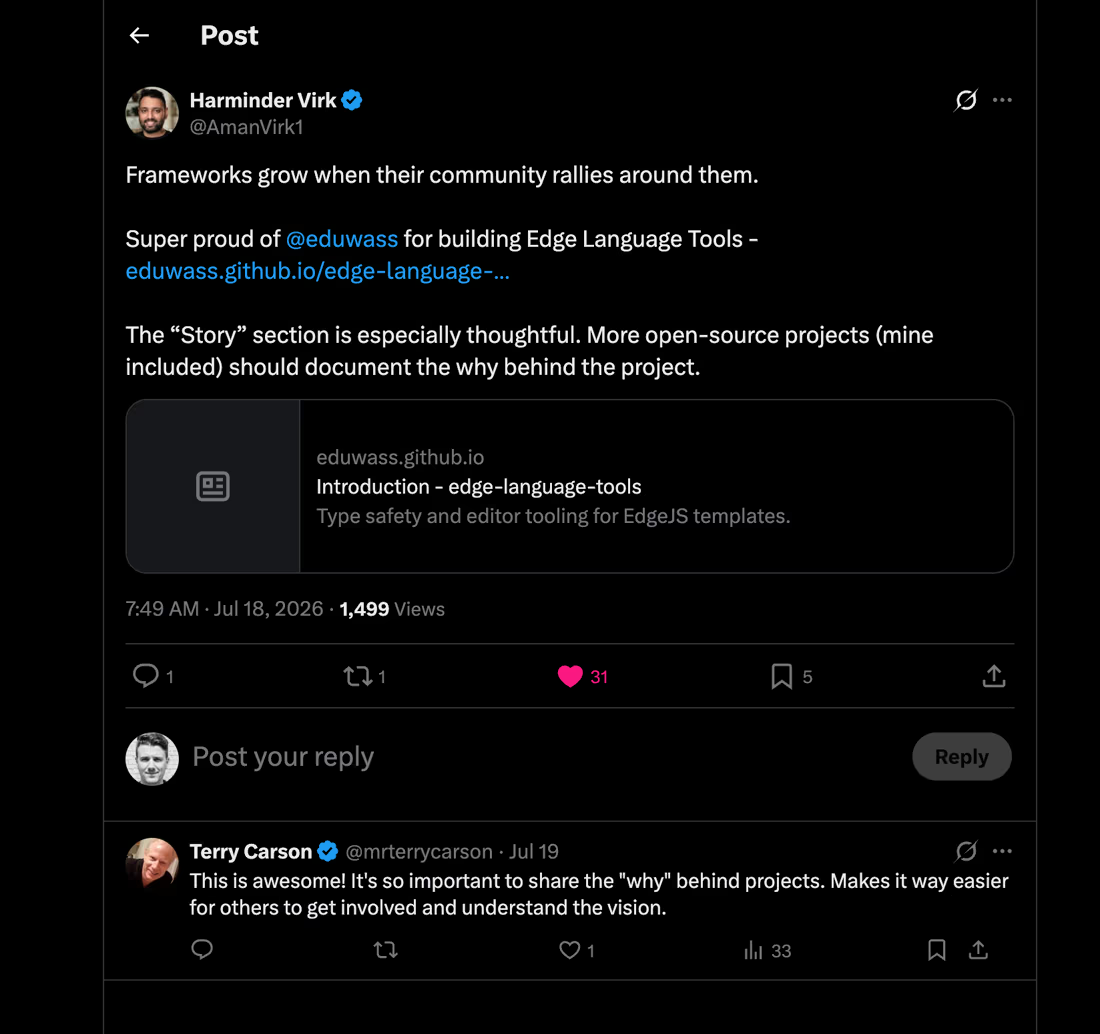
The part he called out was not the language server. It was the Story page, the "why". Which is a good reminder that the research and the write-up are not the overhead around the project; for a proof of concept aimed at maintainers, they *are* the project. Nobody adopts a language server because the code is nice. They adopt it because the reasoning holds up.
Since then the repo has grown a couple of experiments that deserve their own posts: [basecoat-edge](https://github.com/eduwass/edge-language-tools/tree/main/examples/basecoat-edge), a typed Edge port of the Basecoat UI kit with a live type-safe playground, and an experimental `@client` package that extracts marked templates into tiny typed browser render functions, no Edge runtime in the bundle. The [roadmap](https://eduwass.github.io/edge-language-tools/other/roadmap/) is honest about what is missing: slots have no contract yet, `$props` dynamic access is untyped, and the packages are not on npm. The endgame is convergence with the official extension, not competition with it.
## The takeaway
The original itch needed no changes to Edge itself, no fork, no runtime cost, and no "complete LSP from scratch". Volar plus Edge's own lexer and parser plus roughly two thousand lines of generator glue.
The pattern generalizes shamelessly. Any template language whose expressions are close enough to a real language can get this treatment: declare the boundary once, compile constructs to honest control flow, copy expressions verbatim with offset maps, and let the host language's type checker do what it already does better than anything you would build.
I did not build a type checker. I built a translator, and borrowed the best type checker in the industry.
Repo: [github.com/eduwass/edge-language-tools](https://github.com/eduwass/edge-language-tools) · Docs: [eduwass.github.io/edge-language-tools](https://eduwass.github.io/edge-language-tools/)
---
# One Theme, Every Tool: monotheme
Source: https://eduwass.com/building-monotheme/
Date: 2026-06-24
I change color themes the way other people change desktop wallpapers. The problem: my "environment" isn't one app, it's twenty. Ghostty, tmux, Neovim, VSCode, Cursor, Zed, btop, lazygit, yazi, fzf, bat, opencode, Claude Code, even the macOS accent color and Raycast. Switching themes meant hand-porting the same six colors into twenty config formats, getting bored halfway, and living with a half-themed setup forever.
So I built [monotheme](https://github.com/eduwass/monotheme): one source of truth, one command, everything reskins at once.
```bash
theme set
```
Repo: **[github.com/eduwass/monotheme](https://github.com/eduwass/monotheme)**.
## The canonical format problem
The naive approach is to invent your own theme schema — a little YAML file with `background`, `foreground`, eight ANSI colors — and generate everything from that. I tried. It falls apart the moment a real editor wants syntax highlighting, because "the color of a comment" isn't one color. It's the resolution of a TextMate scope like `comment.line.double-slash.ts` against ~140 scope rules with fallbacks.
A 16-color palette can't represent that. So I flipped it: the **canonical format is the full VSCode theme** — the fat one, all 140-odd TextMate scopes intact. That's the source of truth. Everything else *projects down* from it.
- A dumb tool (fzf, btop) gets the normalized 16-ANSI palette.
- A smart tool (Neovim, bat) gets the full scope resolution.
Keep the richest representation as canonical, lose nothing, throw away detail only at the edges where the target can't use it anyway.
## The pipeline
Four stages, each boring on purpose:
```
load → project → adapter → target
```
`load` parses the VSCode theme JSON. `project` derives the normalized palette — bg, fg, ANSI 16, accents — and exposes `resolveToken`, which maps any TextMate scope to its color through a matcher algorithm I ported from VSCode's own resolver. Then each **adapter** renders that into one tool's native format, and each **target** writes the file to the right place and reloads the running app.
The split between adapter (what to write) and target (where to put it and how to reload) is the part that made the whole thing extensible. Adding a new tool is one adapter + one target, and it never touches the core.
## Live reload
`theme set` doesn't just write configs — it reloads the apps that are already running. tmux gets a `source-file`, Ghostty re-reads, Neovim instances get poked. The win isn't really the command, it's that there's no follow-up: no "now restart your terminal," no stale half-themed windows. You run one command and the whole screen flips.
## Install
Needs [Bun](https://bun.sh).
```bash
git clone https://github.com/eduwass/monotheme
cd monotheme && bun install && bun link
```
That puts a `theme` command on your PATH:
```bash
theme list # installed + bundled themes
theme set # project to every tool + live-reload
theme current # active theme
theme check # self-check, no writes
```
Drop `theme init` in your shell rc so a fresh shell re-applies the active theme, and you're done.
It won't touch tools you don't have — if Zed isn't installed, that target is skipped. Start with one or two tools, add adapters as you go.
Repo: **[github.com/eduwass/monotheme](https://github.com/eduwass/monotheme)**.
---
# A Raycast-Style Command Palette for tmux
Source: https://eduwass.com/tmux-palette/
Date: 2026-05-13
Tweeted a screenshot of this earlier today, people asked for the code, open-sourced it the same day: **[github.com/eduwass/tmux-palette](https://github.com/eduwass/tmux-palette)**.
tmux has a million commands and zero discoverability. You either know the bind or you don't. Raycast fixed that for macOS apps. This does the same for tmux: hit a key, fuzzy-find, run.
## The opentui detour
First version used [opentui](https://github.com/anomalyco/opentui) — flexbox layout in the terminal, theming, mouse events. Tutorial-clean code, ~50 lines per palette.
It shipped. It was slow.
```
=== bun no-op === 0.00 s
=== bun + opentui import === 0.19 s
```
opentui ships native Yoga bindings. They deserialize on import. Every popup open paid 190ms loading them before drawing a single character. Felt like a 200ms hiccup every time. `bun build --compile` doesn't help — it bundles the runtime, not the imports.
## The rewrite
I dropped the framework. The renderer now writes ANSI escape codes straight to stdout, like the prototype I started with.
```ts
stdout.write("\x1b[?2026h\x1b[?25l\x1b[H" + frame + "\x1b[?2026l")
```
That's the whole render call. `?2026h/l` is synchronized output — tmux 3.4+ swaps the frame atomically, so holding the arrow key doesn't flicker. Cold start went from 190ms to 20ms.
The framework gained ~100 lines for manual width/scroll/mouse handling. Each palette stayed the same size. Net wash on lines, 10× speedup.
## User-land config
Customization lives in `~/.config/tmux-palette/`. Four JSON files, one job each. Add your own commands without forking:
```json
// ~/.config/tmux-palette/commands.json
[
{ "icon": "", "title": "Toggle Diff Viewer", "category": "Tools",
"action": { "tmux": "run-shell '~/scripts/diff-viewer.sh'" } }
]
```
`shortcuts.json` overrides the right-side label. `theme.json` overrides colors. `aliases.json` adds chips. The source-level `definePalette()` API is still there for power users, but nobody should have to fork to label a key.
## The dispatch trick
tmux's `confirm-before` and `command-prompt` need stdin. If you run them *inside* the popup, they hang — the popup owns stdin.
So the palette doesn't run the command. It writes the encoded command to a tempfile and exits. The bash wrapper reads the file *after* `display-popup` returns and runs it in the host context. Prompts get stdin, users press y/n, world keeps spinning.
```bash
tmux display-popup -E "TMUX_PALETTE_CMD='$CMD_FILE' bun src/cli.ts"
[ -s "$CMD_FILE" ] && eval "tmux $(cat "$CMD_FILE")"
```
Embarrassingly long to figure out the first time. Sub-100-byte fix.
## Install
```bash
git clone https://github.com/eduwass/tmux-palette ~/Sites/tmux-palette
cd ~/Sites/tmux-palette && bun install
```
Then in `.tmux.conf`:
```tmux
bind -n C-Space run-shell "~/Sites/tmux-palette/bin/tmux-palette.sh"
```
Reload, hit Ctrl+Space.
The README has an agent-handoff prompt — paste it into Claude Code / Codex / opencode / Cursor and it does the install, asks you which key to bind, optionally reads your terminal config and writes a matching theme. Onboarding via "paste this into your agent" feels right for 2026.
Repo: **[github.com/eduwass/tmux-palette](https://github.com/eduwass/tmux-palette)**.
---
# Replacing WordPress with 2,300 Lines of Bun
Source: https://eduwass.com/replacing-wordpress-with-2300-lines-of-bun/
Date: 2026-04-23
The site you are reading is around 2,300 lines of TypeScript, Edge templates, and CSS in `src/`. It scored 99/90/100/100 on PageSpeed the first time I ran it, with no performance work done. It builds in under half a second and deploys to a Cloudflare Worker in under 30 seconds on warm caches. It used to be WordPress.
This is the story of why and how I replaced a perfectly working WordPress site with a hand-rolled static site generator, what I built instead, and the weird decisions that ended up being the right ones.
## The old setup
The old eduwass.com was a WordPress install running locally on LocalWP, statically exported to a `/static/` directory via Simply Static, pushed to GitHub, and deployed as a Cloudflare Pages project watching `static/*`. The theme was a custom thing pieced together with the usual plugin pile: Perfmatters for lazy loading, ASE for email cloaking, a dark-mode toggle block, Yoast for SEO, the works.
It worked. It was also constantly costing me small bits of attention: plugin updates, theme drift, a PHP-ish local dev experience, an export step that occasionally produced weirdness, a local MySQL service running for no reason when I'd rather just edit markdown.
The irony was that I was writing plain content in the WordPress editor, then the export produced HTML files, then CF served them statically. At no point in the served-to-visitor path was there any dynamic WordPress behavior. I was paying WordPress's full complexity budget for the authoring side and getting a static HTML stack anyway.
So I ripped it up.
## The goal
Hard constraints I wrote down before starting:
- Every line in the repo is something I understand and can change. No "framework did this magic."
- Content stays portable. Markdown with YAML frontmatter, so if I ever want to move to Astro or Hugo, I copy `content/` and plug it in.
- Dev loop has to feel instant. Not "hit save, see reload a second later" instant — *actually* instant, with state preservation.
- No "click a link, wait for a blank page, see content" navigation feel. Prefetching, speculation rules, whatever it takes.
- Feature parity with the old site's quality-of-life stuff: email cloaking, redirect shortlinks (including cloaked ones that hide the destination), analytics, a GitHub contribution graph, syntax-highlighted code blocks.
I didn't write "deploy to Cloudflare" explicitly but it was implicit — the old site already lived there and I liked the edge-first distribution.
## The stack
Five production dependencies:
```
edge.js templating
shiki syntax highlighting
edge-iconify icon rendering
@iconify-json/* icon data (Lucide + Simple Icons)
```
Bun handles everything else: it's the runtime, the bundler, the dev server, the YAML parser, the markdown parser, the TypeScript transpiler. No Vite, no Webpack, no Astro runtime, no Node.js installed. One tool.
This was a deliberate bet. Bun is new enough to be nervous about, but it's good enough at each of those individual jobs that pulling in a separate tool for each felt like adding weight for marginal quality.
## The build pipeline
`src/build.ts` is 103 lines. Top to bottom, it:
1. Wipes `dist/` and rebuilds CSS and JS with content-hashed filenames.
2. Copies static media (avatar, favicons).
3. Runs an idempotent optimization pass: any raw PNG/JPG becomes AVIF at q60; any MP4 over 1.5MB gets re-encoded with x264 CRF 28 and audio stripped. On an already-optimized repo this is a no-op.
4. Loads every content collection in parallel (posts, pages, projects, site config, redirects, home content).
5. Fetches the GitHub contribution graph via `gh api graphql` at build time (no token shipped; the local `gh` CLI auth is trusted).
6. Constructs the speculation-rules URL list (every internal page, so the browser can prerender on hover).
7. Creates one Edge instance per build with all those collections attached as globals.
8. Renders each page, copies colocated assets, writes redirects, writes the sitemap, RSS feed, and robots.txt.
On a real run: 28 pages, 17 redirects, ~300ms. Warm dev server rebuilds in ~100ms.
## Content as portable markdown
Content lives in `content/`. Every page is markdown with YAML frontmatter:
```markdown
---
title: About
layout: about
links:
- title: Resume
href: /resume/
description: Check my experience.
- title: Testimonials
href: /love/
description: Kind words from clients and colleagues.
---
```
The `layout:` field names a template in `src/templates/pages/`. If absent, it falls back to the default prose wrapper. This is the same convention Hugo and Jekyll use, which means `content/` is fully portable: rename a file, drop it into an Astro or Hugo project, and it works.
The resume is the interesting case. It's a `.md` file with *no* body — everything is structured frontmatter (name, role, experience array, education array, etc.) — and it points at `layout: resume`, which is a standalone Edge template that emits its own `` (no site chrome, matches how resumes want to look).
I experimented briefly with `.edge` files holding both data and layout in one file — a sort of single-file page format — and it's clever but it makes content less portable. Reverting to "content is markdown, layouts are templates" was the right call.
## The HMR trick
The dev server is where I spent the most design time, because I wanted it to feel *better* than framework dev servers, not worse.
The standard full-reload approach wastes everything. You're iterating on a CSS tweak, you scroll to the bottom of a long post to check a margin, save, and the page reloads back to the top. Every time. Intolerable.
So the HMR client (`src/dev/hmr-client.ts`, 90 lines) does a morph instead. On every file save:
1. Fetch the current URL's new HTML.
2. If the hashed CSS link changed, swap the `` — browser re-fetches styles, no flash.
3. If the hashed JS bundle changed, inject a fresh `